What can the Cachly Apple Watch app do?
The Cachly Apple Watch app shows a list of nearby geocaches, navigates you to a cache with compass direction and distance, and lets you log your find directly from the watch. It is designed for hands-free geocaching: the essentials you need in the field, kept in sync with the Cachly app on your iPhone.
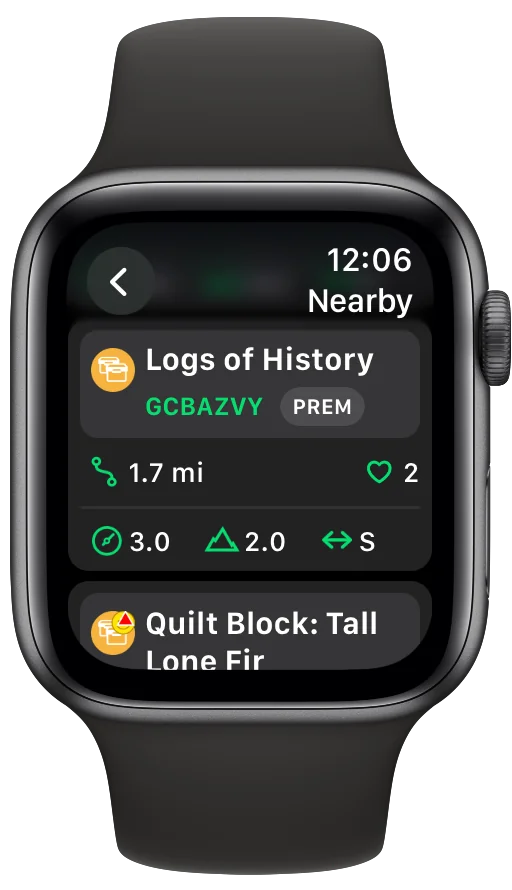
- Nearby cache list — see the geocaches around you at a glance.
- Compass navigation — direction and distance to your target.
- Cache details & attributes — the key information for the cache you're hunting.
- Photo gallery — view cache photos on the watch.
- Quick logging — record your find right from your wrist.
- Search filters — narrow down which caches appear.
- Multiple complications — launch Cachly with one tap from your watch face.
- Real-time sync with iPhone — the watch stays in step with the Cachly app on your phone.
How does compass navigation work on Apple Watch?
Cachly's watch compass points you toward the selected geocache and shows the remaining distance, updating as you move. It's the classic geocaching experience distilled to a glance: raise your wrist, check the arrow, and keep walking. On Apple Watch models with a built-in compass sensor (Series 5 and later), the heading updates even while you're standing still; older models derive heading from GPS, so the arrow updates while you're moving.
Can you search for geocaches from the watch?
Yes — Cachly's Nearby search on Apple Watch finds the geocaches around your current location without you pulling out your iPhone. Search filters let you narrow the results, so the list shows the kinds of caches you actually want to hunt. It's ideal for spontaneous caching: out on a walk, tap your wrist, and see what's hiding nearby.
Can you log geocaches from an Apple Watch?
Yes — Cachly lets you log a geocache directly from the Apple Watch. When you make the find, record it on the spot from your wrist; the log syncs back through your iPhone and follows the same flow as logs written on the phone. No juggling a phone with muddy hands at ground zero.
Cache details, complications, and iPhone sync
Beyond navigation and logging, Cachly's watch app carries the details that matter in the field. Cache details and attributes tell you what you're looking for, and the photo gallery lets you check images right on the watch. Multiple complications put Cachly on your watch face for one-tap launching, and real-time sync with your iPhone means the watch reflects what's happening in the main app.
Is the Apple Watch app included with Cachly?
Yes — the Apple Watch app is included with Cachly's one-time $4.99 purchase on the App Store. There is no subscription and no extra unlock required for the watch app: buy Cachly once and geocaching on your wrist is part of the package. Have questions about pricing or what's included? See the Cachly FAQ.
Take Cachly on your next adventure
The premium geocaching app for iPhone, iPad, and Apple Watch.
Download on the App Store $4.99 one-time · Apple Watch app included