What are Cachly Pro Offline Maps?
Cachly Pro Offline Maps are worldwide vector maps built from OpenStreetMap data, optimized for readability, and available for every corner of the globe. Because they are vector maps rather than pre-rendered image tiles, they stay crisp at every zoom level while taking up far less space on your iPhone — and the map data is updated every two weeks, so trails and roads stay current.
Once a region is downloaded, the map renders entirely from your device. No bars, no roaming plan, no problem: the map behaves exactly as it does at home, whether you are caching in a remote forest, on a cruise, or traveling abroad with data turned off.
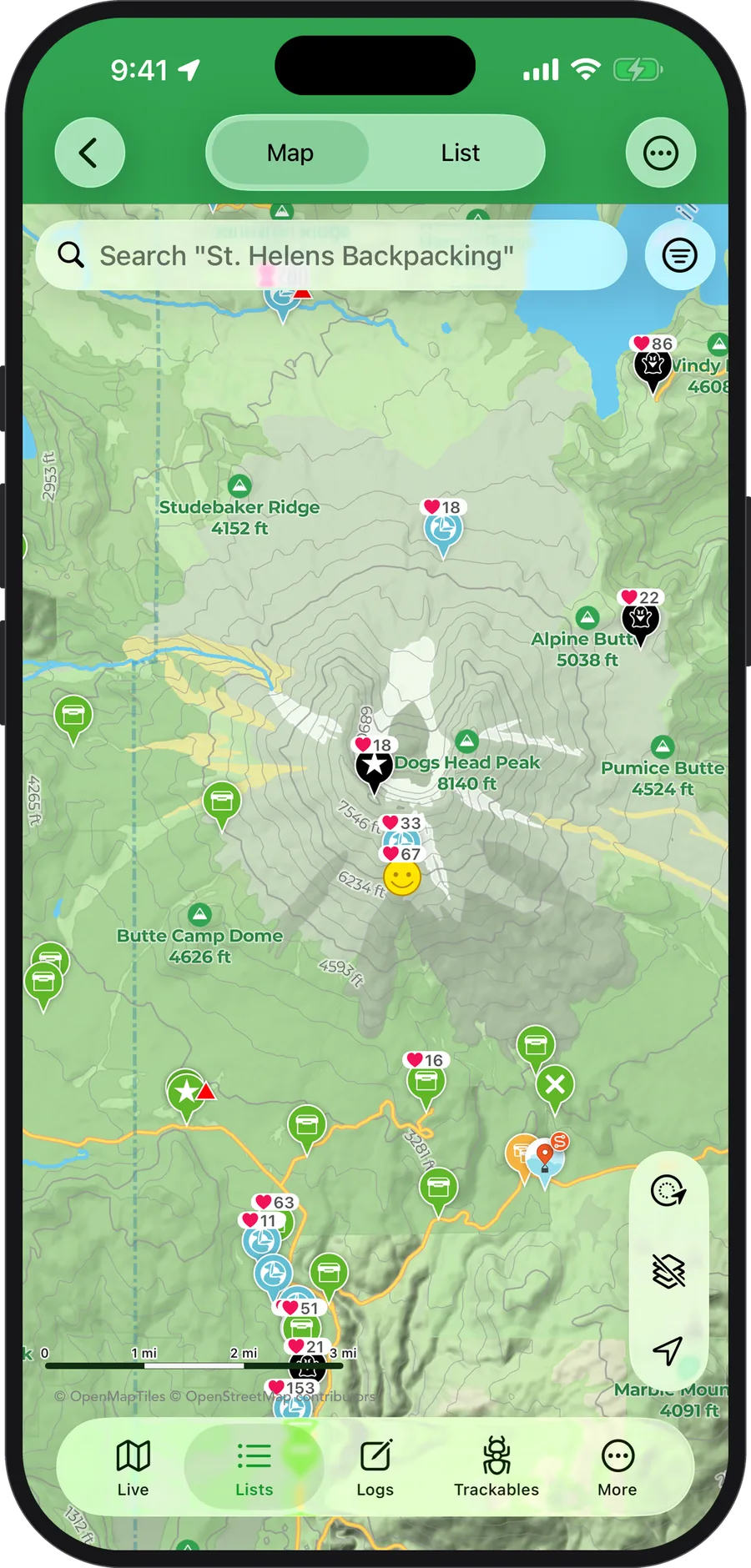
What's on the map?
Cachly's offline maps are made for geocachers, so they show the terrain details that matter on a hike — not just roads. Highlights include:
- Contour lines — downloadable elevation contours that follow your metric or imperial unit setting, so you can judge the climb to ground zero before you commit.
- Hillshade — subtle terrain shading that makes hills, valleys, and ridgelines readable at a glance.
- Trails and points of interest — trail symbols and colors straight from OpenStreetMap, with an optional bold scheme styled after UK Ordnance Survey maps, plus customizable layers for trails and POI.
- County and state boundaries — county lines and names for US states and comparable international regions, handy for county-challenge cachers.
- 3D buildings and 3D rendering — toggle 3D buildings and tilt the map for a three-dimensional view of your surroundings.
Every one of these layers can be shown or hidden, so the map is as clean or as detailed as you like.
How do offline downloads work?
Cachly downloads offline maps by region: choose the area you want, and Cachly fetches it in the background — a background download session keeps even large regions downloading if you leave the app. The Downloads screen shows progress and lets you manage everything you have saved. Contours and hillshade are supplementary downloads, so you only store the detail you actually want.
Offline maps are searchable, too. With an offline map active, Cachly can search map features completely offline within the visible map area — including partial-word matching, so searching “water” finds waterfalls and waterways. Power users can go further with OpenStreetMap POI queries: type q:amenity=parking to place every parking area on the map, or q:amenity=drinking_water to find fountains along the trail.
The best workflow: download your maps over Wi-Fi before you head out, and pair them with an offline list so both the map and the full cache data live on your device.
What works offline without Cachly Pro?
Offline lists are free in Cachly — every copy of the app can save unlimited caches for offline use, with full cache details, images, and logs included. Cachly Pro is not required to cache offline; it adds the offline base map underneath your saved caches, so the map itself renders without a connection too.
The standard app also supports custom tile sources and MBTiles files, so if you already have your own map tiles, Cachly can use them.
Does this work with CarPlay?
Yes — the same Cachly Pro subscription that unlocks offline maps also unlocks full CarPlay support, so you can browse and navigate to nearby caches right from your car's dashboard. See the Cachly CarPlay page for everything it can do.
How much do Pro Offline Maps cost?
Pro Offline Maps are part of the Cachly Pro subscription: $1.99/month or $14.99/year, with a 7-day free trial on every plan. Cachly itself is a one-time $4.99 purchase and is a complete geocaching app without Pro — the subscription is entirely optional. Learn more on the Cachly Pro page or in the FAQ.
Try Pro Offline Maps free for 7 days
Download Cachly, start the free trial, and take the whole world's maps offline.
Download on the App Store Cachly is $4.99 on the App Store · Pro is $1.99/month or $14.99/year